1. Generate Model Class or Data Object of a Database table
While developing a application, we need to create model classes or data objects and generally those Model classes are the replica of our database tables.
So we create them manually by writing code.
Today I'm gonna show you how to auto generate those model classes and use them directly in c#.
you can customize the below code for JAVA classes also.
This article is for generate c# model class from sql server database table.
you can customize the below code for JAVA classes also.
This article is for generate c# model class from sql server database table.
2. Model Class Generator code.
DECLARE
@TableName VARCHAR(MAX) = 'Product' -- Replace 'Product' with your table name
DECLARE
@TableSchema VARCHAR(MAX) = 'Production' -- Replace 'Production' with your schema name example-dbo
DECLARE
@result varchar(max) = ''
SET
@result = @result +
'using System;' +
CHAR(13) + CHAR(13)
IF (@TableSchema IS NOT NULL)
BEGIN
SET @result
= @result + 'namespace ' +
@TableSchema +
CHAR(13) + '{' + CHAR(13)
END
SET
@result = @result +
CHAR(9)+ 'public class ' + @TableName + CHAR(13) +CHAR(9)+ '{' + CHAR(13)
SELECT
@result = @result +
CHAR(13)
+CHAR(9)+ ' public ' + ColumnType + ' ' + ColumnName + ' { get; set; } ' + CHAR(13)
FROM
(
SELECT c.COLUMN_NAME AS
ColumnName
,CASE c.DATA_TYPE
WHEN 'bigint' THEN
CASE C.IS_NULLABLE
WHEN
'YES' THEN 'long?' ELSE 'long' END
WHEN 'binary' THEN 'Byte[]'
WHEN 'bit' THEN
CASE C.IS_NULLABLE
WHEN
'YES' THEN 'bool?' ELSE 'bool' END
WHEN 'char' THEN 'string'
WHEN 'date' THEN
CASE C.IS_NULLABLE
WHEN
'YES' THEN 'DateTime?' ELSE 'DateTime' END
WHEN 'datetime' THEN
CASE C.IS_NULLABLE
WHEN
'YES' THEN 'DateTime?' ELSE 'DateTime' END
WHEN 'datetime2' THEN
CASE C.IS_NULLABLE
WHEN
'YES' THEN 'DateTime?' ELSE 'DateTime' END
WHEN 'datetimeoffset' THEN
CASE C.IS_NULLABLE
WHEN 'YES' THEN 'DateTimeOffset?' ELSE
'DateTimeOffset' END
WHEN 'decimal' THEN
CASE C.IS_NULLABLE
WHEN
'YES' THEN 'decimal?' ELSE 'decimal' END
WHEN 'float' THEN
CASE C.IS_NULLABLE
WHEN
'YES' THEN 'single?' ELSE 'single' END
WHEN 'image' THEN 'Byte[]'
WHEN 'int' THEN
CASE C.IS_NULLABLE
WHEN
'YES' THEN 'int?' ELSE 'int' END
WHEN 'money' THEN
CASE C.IS_NULLABLE
WHEN
'YES' THEN 'decimal?' ELSE 'decimal' END
WHEN 'nchar' THEN 'string'
WHEN 'ntext' THEN 'string'
WHEN 'numeric' THEN
CASE C.IS_NULLABLE
WHEN
'YES' THEN 'decimal?' ELSE 'decimal' END
WHEN 'nvarchar' THEN 'string'
WHEN 'real' THEN
CASE C.IS_NULLABLE
WHEN
'YES' THEN 'double?' ELSE 'double' END
WHEN 'smalldatetime' THEN
CASE C.IS_NULLABLE
WHEN
'YES' THEN 'DateTime?' ELSE 'DateTime' END
WHEN 'smallint' THEN
CASE C.IS_NULLABLE
WHEN
'YES' THEN 'short?' ELSE 'short'END
WHEN 'smallmoney' THEN
CASE C.IS_NULLABLE
WHEN
'YES' THEN 'decimal?' ELSE 'decimal' END
WHEN 'text' THEN 'string'
WHEN 'time' THEN
CASE C.IS_NULLABLE
WHEN
'YES' THEN 'TimeSpan?' ELSE 'TimeSpan' END
WHEN 'timestamp' THEN
CASE C.IS_NULLABLE
WHEN
'YES' THEN 'DateTime?' ELSE 'DateTime' END
WHEN 'tinyint' THEN
CASE C.IS_NULLABLE
WHEN
'YES' THEN 'byte?' ELSE 'byte' END
WHEN 'uniqueidentifier' THEN
'Guid'
WHEN 'varbinary' THEN 'byte[]'
WHEN 'varchar' THEN 'string'
ELSE 'Object'
END AS ColumnType
, c.ORDINAL_POSITION
FROM INFORMATION_SCHEMA.COLUMNS c
WHERE c.TABLE_NAME
= @TableName and
ISNULL(@TableSchema, c.TABLE_SCHEMA) = c.TABLE_SCHEMA
) t
ORDER BY t.ORDINAL_POSITION
SET
@result = @result +CHAR(9) + '}' + CHAR(13)
IF (@TableSchema IS NOT NULL)
BEGIN
SET @result
= @result + CHAR(13) + '}'
END
PRINT
@result
The above one is a SQL Code which generates output similar to model class, so that you can copy that and paste it in your C# classes.
Model Class generator code explanation.
It gets the schema information and all the column names using INFORMATION_SCHEMA.COLUMNS of a particular table.
Then there are some switch cases to replace sql data types to C# data types.
So basically the above sql query generates a string similar to Model class.
3. How to use the Model Class Generator
One simple way would to just copy the above and paste it into a new query window and give the table name and schema name.
In my case i have AdventureWorkDB and i want a Model class for Product table.
so i have given as below:
DECLARE @TableName VARCHAR(MAX) = 'Product' -- Replace 'Product' with your table name
DECLARE @TableSchema VARCHAR(MAX) = 'Production' -- Replace 'Production' with your schema name example-dbo
Another best way would be to create a store procedure with the name of "USP_GenerateModelClass" and make table name and schema name as parameter like below:
Create Procedure USP_GenerateModelClass
(
@tblName varchar(50),
@schemaName varchar(50)='dbo'
)
as
Begin
DECLARE
@TableName VARCHAR(MAX) = @tblName -- Replace
'Product' with your table name
DECLARE
@TableSchema VARCHAR(MAX) = @schemaName -- Replace
'Production' with your schema name
DECLARE
@result varchar(max) = ''
SET
@result = @result +
'using System;' +
CHAR(13) + CHAR(13)
IF (@TableSchema IS NOT NULL)
BEGIN
SET @result
= @result + 'namespace ' +
@TableSchema +
CHAR(13) + '{' + CHAR(13)
END
SET
@result = @result +
CHAR(9)+ 'public class ' + @TableName + CHAR(13) +CHAR(9)+ '{' + CHAR(13)
SELECT
@result = @result +
CHAR(13)
+CHAR(9)+ ' public ' + ColumnType + ' ' + ColumnName + ' { get; set; } ' + CHAR(13)
FROM
(
SELECT c.COLUMN_NAME AS
ColumnName
,CASE c.DATA_TYPE
WHEN 'bigint' THEN
CASE C.IS_NULLABLE
WHEN
'YES' THEN 'long?' ELSE 'long' END
WHEN 'binary' THEN 'Byte[]'
WHEN 'bit' THEN
CASE C.IS_NULLABLE
WHEN
'YES' THEN 'bool?' ELSE 'bool' END
WHEN 'char' THEN 'string'
WHEN 'date' THEN
CASE C.IS_NULLABLE
WHEN
'YES' THEN 'DateTime?' ELSE 'DateTime' END
WHEN 'datetime' THEN
CASE C.IS_NULLABLE
WHEN
'YES' THEN 'DateTime?' ELSE 'DateTime' END
WHEN 'datetime2' THEN
CASE C.IS_NULLABLE
WHEN
'YES' THEN 'DateTime?' ELSE 'DateTime' END
WHEN 'datetimeoffset' THEN
CASE C.IS_NULLABLE
WHEN 'YES' THEN 'DateTimeOffset?' ELSE
'DateTimeOffset' END
WHEN 'decimal' THEN
CASE C.IS_NULLABLE
WHEN
'YES' THEN 'decimal?' ELSE 'decimal' END
WHEN 'float' THEN
CASE C.IS_NULLABLE
WHEN
'YES' THEN 'single?' ELSE 'single' END
WHEN 'image' THEN 'Byte[]'
WHEN 'int' THEN
CASE C.IS_NULLABLE
WHEN
'YES' THEN 'int?' ELSE 'int' END
WHEN 'money' THEN
CASE C.IS_NULLABLE
WHEN
'YES' THEN 'decimal?' ELSE 'decimal' END
WHEN 'nchar' THEN 'string'
WHEN 'ntext' THEN 'string'
WHEN 'numeric' THEN
CASE C.IS_NULLABLE
WHEN
'YES' THEN 'decimal?' ELSE 'decimal' END
WHEN 'nvarchar' THEN 'string'
WHEN 'real' THEN
CASE C.IS_NULLABLE
WHEN
'YES' THEN 'double?' ELSE 'double' END
WHEN 'smalldatetime' THEN
CASE C.IS_NULLABLE
WHEN
'YES' THEN 'DateTime?' ELSE 'DateTime' END
WHEN 'smallint' THEN
CASE C.IS_NULLABLE
WHEN
'YES' THEN 'short?' ELSE 'short'END
WHEN 'smallmoney' THEN
CASE C.IS_NULLABLE
WHEN
'YES' THEN 'decimal?' ELSE 'decimal' END
WHEN 'text' THEN 'string'
WHEN 'time' THEN
CASE C.IS_NULLABLE
WHEN
'YES' THEN 'TimeSpan?' ELSE 'TimeSpan' END
WHEN 'timestamp' THEN
CASE C.IS_NULLABLE
WHEN
'YES' THEN 'DateTime?' ELSE 'DateTime' END
WHEN 'tinyint' THEN
CASE C.IS_NULLABLE
WHEN
'YES' THEN 'byte?' ELSE 'byte' END
WHEN 'uniqueidentifier' THEN
'Guid'
WHEN 'varbinary' THEN 'byte[]'
WHEN 'varchar' THEN 'string'
ELSE 'Object'
END AS ColumnType
, c.ORDINAL_POSITION
FROM INFORMATION_SCHEMA.COLUMNS c
WHERE c.TABLE_NAME
= @TableName and
ISNULL(@TableSchema, c.TABLE_SCHEMA) = c.TABLE_SCHEMA
) t
ORDER BY t.ORDINAL_POSITION
SET
@result = @result +CHAR(9) + '}' + CHAR(13)
IF (@TableSchema IS NOT NULL)
BEGIN
SET @result
= @result + CHAR(13) + '}'
END
PRINT
@result
END
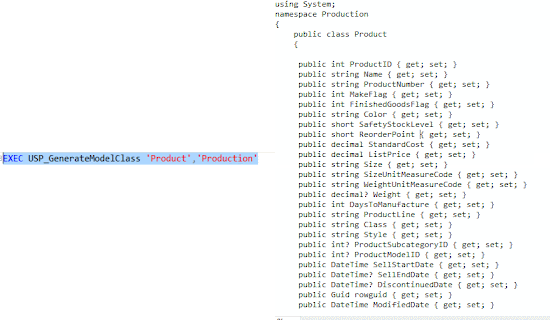
Now execute the store Procedure like below.
EXEC
USP_GenerateModelClass 'Product','Production'
OR
EXEC USP_GenerateModelClass 'Employee' //default schema is 'dbo'
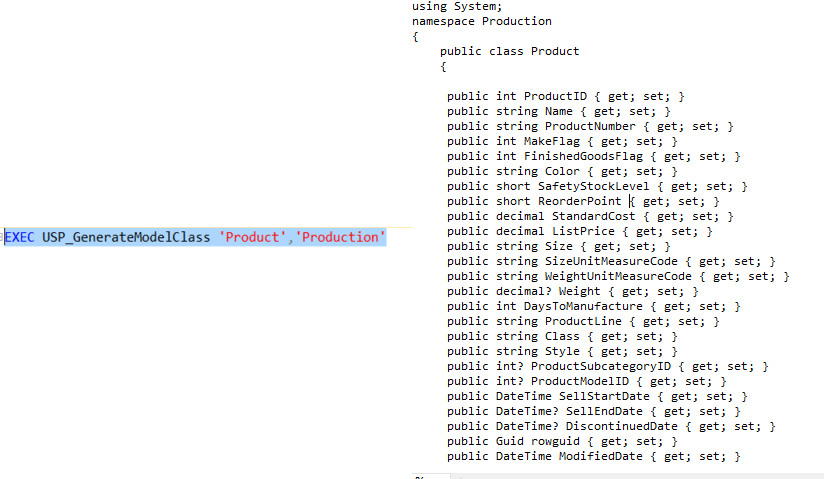
And it will return the output as below:
using System;
namespace Production
{
public class Product
{
public int ProductID { get; set; }
public string Name { get; set; }
public string ProductNumber { get; set; }
public int MakeFlag { get; set; }
public int FinishedGoodsFlag { get; set; }
public string Color { get; set; }
public short SafetyStockLevel { get; set; }
public short ReorderPoint { get; set; }
public decimal StandardCost { get; set; }
public decimal ListPrice { get; set; }
public string Size { get; set; }
public string SizeUnitMeasureCode { get; set; }
public string WeightUnitMeasureCode { get; set; }
public decimal? Weight { get; set; }
public int DaysToManufacture { get; set; }
public string ProductLine { get; set; }
public string Class { get; set; }
public string Style { get; set; }
public int? ProductSubcategoryID { get; set; }
public int? ProductModelID { get; set; }
public DateTime SellStartDate { get; set; }
public DateTime? SellEndDate { get; set; }
public DateTime? DiscontinuedDate { get; set; }
public Guid rowguid { get; set; }
public DateTime ModifiedDate { get; set; }
}
}
That's great, Isn't it. It gave me the output as i wanted.
4. Any Question?
Hope you guys liked my article, Please do write your comments in the comment section.
