Search in Help for developer site.

Sunday, 15 January 2017

Difference between Const, Readonly and Static Keywords in C#


Constant and ReadOnly keyword are used to make a field constant which value cannot be modified. Static keyword is used to make members static that can be shared by all the class objects. In this article, I am going to explain the difference among these three.


Constant

Constant fields or local variables must be assigned a value at the time of declaration and after that they cannot be modified. By default constant are static, hence you cannot define a constant type as static.
public const int X = 10;
A const field is a compile-time constant. A constant field or local variable can be initialized with a constant expression which must be fully evaluated at compile time.
  1. void Calculate(int Z)
  2. {
  3. const int X = 10, X1 = 50;
  4. const int Y = X + X1; //no error, since its evaluated a compile time
  5. const int Y1 = X + Z; //gives error, since its evaluated at run time
  6. }
You can apply const keyword to built-in value types (byte, short, int, long, char, float, double, decimal, bool), enum, a string literal, or a reference type which can be assigned with a value null.
  1. const MyClass obj1 = null;//no error, since its evaluated a compile time
  2. const MyClass obj2 = new MyClass();//gives error, since its evaluated at run time
Constants can be marked as public, private, protected, internal, or protected internal access modifiers.
Use the const modifier when you sure that the value a field or local variable would not be changed.

ReadOnly

A readonly field can be initialized either at the time of declaration or with in the constructor of same class. Therefore, readonly fields can be used for run-time constants.
  1. class MyClass
  2. {
  3. readonly int X = 10; // initialized at the time of declaration
  4. readonly int X1;
  5.  
  6. public MyClass(int x1)
  7. {
  8. X1 = x1; // initialized at run time
  9. }
  10. }

  11. Explicitly, you can specify a readonly field as static since, like constant by default it is not static. Readonly keyword can be apply to value type and reference type (which initialized by using the new keyword) both. Also, delegate and event could not be readonly.
    Use the readonly modifier when you want to make a field constant at run time.

Static

The static keyword is used to specify a static member, which means static members are common to all the objects and they do not tied to a specific object. This keyword can be used with classes, fields, methods, properties, operators, events, and constructors, but it cannot be used with indexers, destructors, or types other than classes.
  1. class MyClass
  2. {
  3. static int X = 10;
  4. int Y = 20;
  5. public static void Show()
  6. {
  7. Console.WriteLine(X);
  8. Console.WriteLine(Y); //error, since you can access only static members
  9. }
  10. }

Key points about Static keyword

  1. If the static keyword is applied to a class, all the members of the class must be static.
  2. Static methods can only access static members of same class. Static properties are used to get or set the value of static fields of a class.
  3. Static constructor can't be parameterized. Access modifiers can not be applied on Static constructor, it is always a public default constructor which is used to initialize static fields of the class.
What do you think?
I hope you will enjoy the tips while programming with C#. I would like to have feedback from my blog readers. Your valuable feedback, question, or comments about this article are always welcome.

Friday, 6 January 2017

The Perfect Real Time Example of Interface in OOPS

 The Perfect Real Time Example of Interface in OOPS

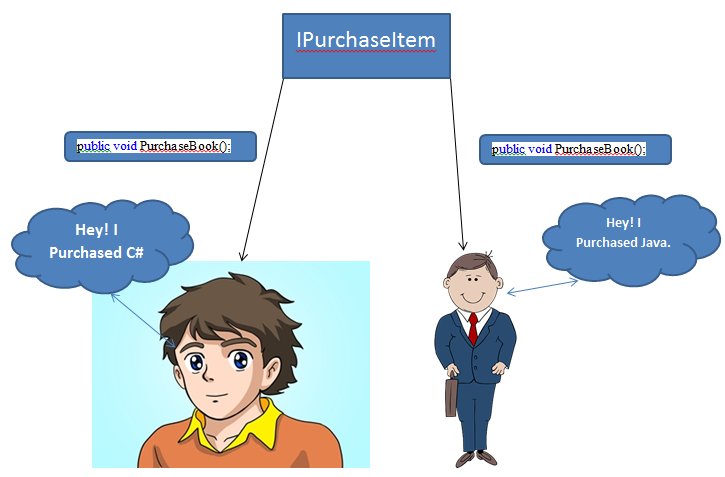
Suppose your parents gives you a list of items to purchase,
that list is an Interface that you will implement at the time of purchasing.....
Means Before implementing any thing , you list out what you have to do that will be an interface......


Now Lets implement it in programming way:-


//Here Parent gives list of Items to purchase.So we listed out the Items
        interface IPurchaseItem
        {
            void PurchaseBook();
        }

        //Implementation while Purchasing.
        class Person1Purchasing:IPurchaseItem
        {
            public void PurchaseBook()
            {
                Console.WriteLine("Hey! I purchased C Sharp Book");
            }
            //other code here
        }
        class Person2Purchasing : IPurchaseItem
        {
            //Different Implementation
            public void PurchaseBook()
            {
                Console.WriteLine("Hey! I purchased Java Programming Book");
            }
            //other code here
        }


Description:-
Here we have one interface having PurchaseBook() method so now it depends on classes how they implement it. So here Person1 purchased C Sharp book and Person2 purchased Java Programming book.


I hope now you have a clear vision about Interface.

Note:-Its my own understanding on Interface.So Please correct me if i am wrong. Write your comments into the Comments section below.


LAG and LEAD Analytical Functions in Sql Server with Real Time Examples

LAG and LEAD Analytical Functions in Sql Server with Real Time Examples
Hello folks, Today I am going to share LAG and LEAD Analytical Functions in Sql Server. After reading this article you will be able to Understand and work with both the Analytical Functions.

1.   LAG Function:-

In SQL Server (Transact-SQL), the LAG function is an analytic function that lets you query more than one row in a table at a time without having to join the table to itself. It returns values from a previous row in the table. 

Syntax

LAG( expression [, offset [, default] ]) 
OVER ( [query_partition_clause ] order_by_clause )

Arguments Description:-
expression
 An expression that can contain other built-in functions, but can not contain any analytic functions.

offset
Optional. It is the physical offset from the current row in the table. If this parameter is omitted, the default is 1.

default 
Optional. It is the value that is returned if the offset goes out of the bounds of the table. If this parameter is omitted, the default is null.

query_partition_clause 
Optional. It is used to partition the results into groups based on one or more expressions.

order_by_clause 
Optional. It is used to order the data within each partition.

Applies To
The LAG function can be used in the following versions of SQL Server (Transact-SQL):
SQL Server 2014, SQL Server 2012

Example:-

Lets take an Example we have following Student data.


And we want to know the previous mark like this.

Another Example would be like we have Customer data with their order date so we want to know the Order Date along with Previous Order date so we would know what was the Previous Order date.


So now to achieve this data we will use LAG function as follow.


SELECT studentName, Mark,
LAG(Mark) OVER( ORDER BY Mark) AS PrevMark
FROM Exam order by Mark

So now it would return above result.

In this example, the LAG function will sort in ascending order all of the Mark values in the Student table.

2.   LEAD Function:-

Accesses data from a subsequent row in the same result set without the use of a self-join in SQL Server 2016. LEAD provides access to a row at a given physical offset that follows the current row. Use this analytic function in a SELECT statement to compare values in the current row with values in a following row.

Syntax

LEAD ( scalar_expression [ ,offset ] , [ default ] )  
    OVER ( [ partition_by_clause ] order_by_clause ) 

Arguments Description:-

scalar_expression
The value to be returned based on the specified offset. It is an expression of any type that returns a single (scalar) value. scalar_expression cannot be an analytic function.

offset
The number of rows forward from the current row from which to obtain a value. If not specified, the default is 1. offset can be a column, subquery, or other expression that evaluates to a positive integer or can be implicitly converted to bigint. offset cannot be a negative value or an analytic function.

default
The value to return when scalar_expression at offset is NULL. If a default value is not specified, NULL is returned. default can be a column, subquery, or other expression, but it cannot be an analytic function. default must be type-compatible with scalar_expression.

OVER ( [ partition_by_clause ] order_by_clause)
partition_by_clause divides the result set produced by the FROM clause into partitions to which the function is applied. If not specified, the function treats all rows of the query result set as a single group. order_by_clause determines the order of the data before the function is applied. When partition_by_clause is specified, it determines the order of the data in each partition. The order_by_clause is required.

Examples:-

Compare values between years
The query uses the LEAD function to return the difference in sales quotas for a specific employee over subsequent years. Notice that because there is no lead value available for the last row, the default of zero (0) is returned.


Conclusion
In this article I discussed how you can use LAG and LEAD analytical function to access or query data from previous or subsequent rows without writing  self-join query. Write your queries into the comments section.


Wednesday, 4 January 2017

what are the access modifiers

what are the access modifiers in c#


Access modifiers (or access specifiers) are keywords in object-oriented languages that set the accessibility of classes, methods, member function, member variables etc. Access modifiers are a specific part of programming language syntax used to facilitate the encapsulation of components, It defines the accessibility of the specific type (e.g class, struct), data member etc.
In c# there are five type of access modifiers -
  • Public
  • Private
  • Protected
  • Internal
  • Protected Internal

Accessibility of access modifies in c#

Access Modifiers
Inside Assembly
Outside Assembly
With Inheritance
With Type
With Inheritance
With Type
Public
ü
ü
ü
ü
Private
X
X
X
X
Protected
ü
X
ü
X
Internal
ü
ü
X
X
Protected Internal
ü
ü
ü
X

Explanation of Public, Protected, Private, Internal And Protected Internal Access Modifiers In C#

Public: - Public members are accessible anywhere, inside the type (e.g. - class), outside the type, inside the assembly, outside the assembly, through the inheritance or with the type (e.g. instance of class, with type of class in case of static).

Private: - Private members are only accessible within the own type (Own class).

Protected: - Protected members are accessible only with its derived types whether it is inside the assembly or outside the assembly.

Internal: - Internal members are accessible only within the assembly by inheritance (its derived type) or by instance of class.

Protected Internal: - Protected internal is type of access modifier contains protected member properties as well as internal member properties, means protected internal member accessible inside the assembly in its derived class or with the instance of the class and accessible outside the class only in its derived class.